






Cars -- 2 days ago

Accessories separate casual play from considered play. The right additions improve posture, precision and longevity, without cluttering the desk or shouting for attention.
At first glance, a modern gaming laptop looks like a complete solution. It boots faster than you do, runs the latest titles without breaking a sweat, and somehow squeezes more power into a slim rectangle than most of us could be trusted with. Then you actually live with it for a while.
The fans sound panicked, your wrists ache from the trackpad, the single USB port you are not already using is clinging to a dongle for dear life, and the internal SSD is down to its last 12 gigabytes because you insisted on installing three open world epics and keeping all of your “work projects” in 4K. At this point, you realise an uncomfortable truth, the laptop is only half the story. The rest lives in the accessories.
In 2025, the best gaming laptop accessories are less about rainbow lighting and more about infrastructure. They cool, connect, store, illuminate and generally civilise your very fast, very warm travelling companion. What follows is a tour of the kit that actually earns its place in your bag or on your desk, the difference between “I own a nice gaming laptop” and “I have a proper setup that happens to fold shut”.

Before you buy anything with RGB on it, you buy air. A gaming laptop’s natural state is “trying not to melt”. The CPU and GPU would happily draw desktop levels of power if the laws of physics would let them. Your job is to give the poor thing some breathing room.
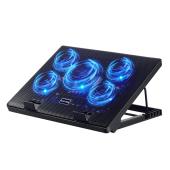
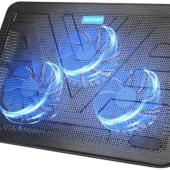
Cooling pads have improved from the days when they were essentially noisy metal trays. At the sensible end, the Kootek Cooler Pad Chill Mat 5 is still one of the most dependable options for 15 to 17-inch machines. Five fans push a decent column of air into the underside of the chassis, the stand angle is adjustable enough to save your neck, and the entire contraption looks more like a piece of sensible office equipment than a spaceship. For something slimmer, the TeckNet N8 uses two larger fans and a lighter frame, ideal if your laptop spends as much time in cafés as it does at home.
If you want something more deliberate, Cooler Master’s NotePal XL and Thermaltake’s Massive 20 RGB both throw subtlety out of the window and focus on shifting as much air as possible. The NotePal XL uses a single enormous fan and carefully shaped vents to spread airflow evenly under the laptop. The Massive 20 goes one better with a 200 millimetre fan and enough RGB to let passing aircraft know that you are currently in a ranked match. Both excel with the larger 17 and 18-inch beasts that smaller pads simply cannot keep up with.
Then there are the more specialised pads that treat cooling as a kind of private engineering project. The Llano V10 gained a small cult following this year when reviewers noticed temperature drops in the low double digits during stress tests. It achieves that with an aggressive sealed blower design that moves serious air at the cost of some noise, which frankly is part of the charm. Razer has joined the party with its own Laptop Cooling Pad, a black slab with “smart” temperature-controlled fans and a semi-sealed pressure chamber designed to line up with the vents on its Blade series and other 14 to 18-inch machines. It is over-built, slightly over-priced and exactly what you would expect from a company that makes mouse mats like jewellery.
Whichever pad you choose, the aim is the same. Cooler components boost higher, for longer, and throttle less often. Your frame rate becomes more stable, your fans spend more time at “whooshing politely” and less at “small aircraft on take-off”, and the life expectancy of your expensive silicon quietly increases.
The gaming laptop is at its most impressive when docked. On a desk, plugged into a screen or three, with keyboard, mouse, Ethernet, external drives and perhaps a capture card all humming away, it graduates from “big gaming notebook” to “compact desktop with hinges”. To get there without crawling under the table every time you sit down, you need a proper dock.
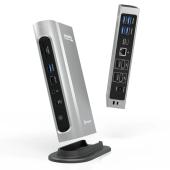
Thunderbolt and USB-C docks have grown up in tandem with the laptops they serve. At the pragmatic end, the Plugable TBT4-UDZ has become a sort of unofficial standard. It offers Thunderbolt 4 throughput, plenty of USB-A for your various legacy sins, DisplayPort and HDMI outputs for multiple monitors, Ethernet for when your Wi-Fi resembles shared dial-up, and audio in and out so that you can leave your headset and speakers permanently connected. Plug in a single cable and your laptop becomes a full workstation. Unplug it, and you are back to a reasonably portable gaming machine.
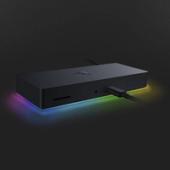
If you prefer your practicalities with a little a little neon, the Razer Thunderbolt 4 Dock Chroma performs a similar role with a heavier emphasis on aesthetics. Under the glossy shell, it is a perfectly capable Thunderbolt dock. Along the bottom edge, of course, sits a tasteful RGB strip that can be synced with the rest of your Razer gear, because it would be a shame if your ports did not also participate in the lighting scheme.
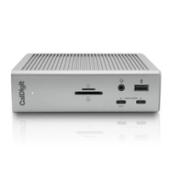
For those who enjoy over provision, the CalDigit TS4 remains the connoisseur’s choice. Forty gigabit Thunderbolt 4, an almost comical number of USB ports, multiple DisplayPort outputs, fast card readers, it is the closest thing to bolting a half rack of connectivity to your laptop. As Thunderbolt 5 emerges, products like Kensington’s Triple 4K TB5 dock point towards a future where a single cable from your gaming laptop runs three 4K panels at comfortable refresh rates while still feeding everything else on your desk.
If all of that sounds like too much box, the newer Anker 13 in 1 Nano dock does something rather clever. It behaves like a full desktop dock while you are at home, then allows its heart, a credit-card-sized USB-C hub, to detach and come with you. It is a neat compromise for those whose laptop schedules are split evenly between desk and train seat.
The goal here is simple. You want one thick cable from laptop to dock, and no thought at all about the rest. Monitors, keyboard, mouse, storage, Ethernet, capture card, microphone should all be waiting when you arrive. Gaming laptops have the horsepower to replace a desktop; a good dock merely gives them the dignity.

Trackpads are a triumph of engineering and a menace in games. If you are still attempting to play anything more demanding than a turn-based strategy title on a glass slab, you deserve both admiration and an intervention.
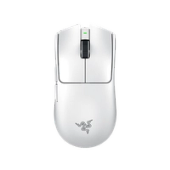
In 2025, the Razer zoo dominates the upper reaches of gaming mouse recommendations. The Viper V3 Pro is the darling of esports-minded reviewers: ultra-light, blisteringly fast sensor, no extraneous frills, the sort of mouse that feels as if it might try to win the match without you. It suits claw and fingertip grips, excels at shooters and makes your laptop feel less like a compromise and more like an unfair advantage.
For those who like a little more comfort and a few more buttons, the Basilisk V3 Pro offers a contoured shell with room for your thumb, a full complement of programmable inputs and the same absurdly capable Focus Pro 35K sensor. It is the mouse for people who want to bind half an MMO to one hand and never touch the keyboard again.
Then there is the DeathAdder V4 Pro, the latest iteration of a shape that has been attached to gaming PCs for what feels like geological time. It is ergonomic without being enormous, fast without being twitchy and, crucially, comfortable to use for hours of non-gaming work as well. If your laptop doubles as a coding or writing machine, that matters more than one extra percentage point of flick-shot performance.
If you prefer not to live entirely in the Razer ecosystem, the venerable Logitech G502 remains one of the most popular all-rounders on the planet, with a shape that fits a remarkable number of hands and a wheel that can go from precise clicks to free-spin chaos at the press of a button. It is not the lightest option, but it is versatile and dependable, which is more than can be said for most of us.
Whichever you choose, the rule stands: a proper mouse is the cheapest, most transformative accessory you can buy for a gaming laptop. Your aim will improve, your menus will feel less like puzzles, and your productivity in anything involving dragging and dropping will quietly double.
Gaming laptop keyboards have improved, but physics is not on their side. Short travel, cramped layouts and warm palm rests are an unavoidable result of stuffing a furnace under your fingers. If you are going to spend hours typing essays, emails or elaborately worded resignations, a separate keyboard is an act of self-respect.
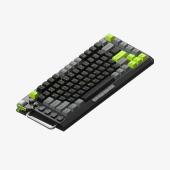
At the enthusiast end, the NuPhy Field75HE is a wonderfully absurd object: a compact 75 per cent board with Hall-effect switches that let you adjust the actuation point of each key and clever firmware that essentially turns key presses into analogue events. All of that is overkill for an essay on constitutional law, but the build quality, typing feel and compact footprint make it an excellent companion to a gaming laptop. It works wired or wireless, pairs happily with a dock, and looks more like a piece of industrial design than a prop from a streamer’s studio.
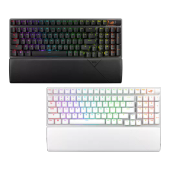
If you want something directly from the gaming houses, the Asus ROG Strix Scope II 96 Wireless is a strong contender. It squeezes a full key set, including numpad, into a slightly compressed 96 per cent layout, offers tri-mode connectivity (wireless dongle, Bluetooth, USB-C), and has switches tuned for rapid actuation and satisfying thock rather than hollow clack. With the lighting turned down to grown-up levels, it would not offend even the most conservative desk.
Then there is the perennial favourite for players who care more about performance than appearance: the Wooting 60HE v2. It is small, yes, but inside are some of the most advanced switches and firmware in the business. Adjustable actuation, rapid reset and all the other tricks that competitive players now see as necessities. It is a bizarrely serious object that happens to look like a toy, and it plays particularly well with gaming laptops because it occupies so little physical and mental space.
If you need something more traditional in layout, SteelSeries’ Apex Pro TKL continues to sit near the top of recommendation lists. It offers per-key actuation adjustment, a comfortable tenkeyless layout and enough customisation options to keep even the most obsessive tweaker amused for an evening instead of doing their actual work.
The principle is the same across all of these. Get the keyboard you enjoy typing on. Your laptop’s own keys will still be there for emergencies and train journeys; your hands will thank you every time you sit at a desk and realise that you no longer have to compromise.

Laptop speakers have improved in the sense that they now sound less like trapped insects and more like slightly confused radios. This is progress. It is not enough.
A good gaming headset solves several problems at once. It gives you positional audio that actually lets you hear where the problem is coming from. It provides a microphone that does not make you sound as though you are speaking from inside a heating duct. It also means you can play late at night without becoming a topic of conversation in the building’s WhatsApp group.
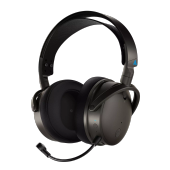
At the indulgent end sits the Audeze Maxwell Wireless. Planar magnetic drivers, wide soundstage, serious detail, it is arguably a more audiophile, noise-cancelling headphone than “gamer gear”, but it also includes the low-latency wireless you need for competitive play and a microphone that does not disgrace itself. If you want one headset for games, films and music, and you are willing to invest, this is about as good as it gets.
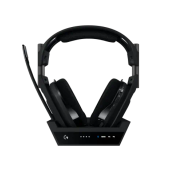
The Astro A50 X takes a different path. It is a feature-rich system with a base station that doubles as an HDMI switcher, letting you connect PC, console and other devices and route both video and audio through one tidy hub. For a gaming laptop that travels between living room and desk, this can be oddly life-changing. No more crawling around behind televisions; just dock the headset and press the appropriate button.
Further down the pricing ladder, the Razer BlackShark V2 Pro continues to be irritatingly good. Light, comfortable, long battery life, surprisingly grown-up sound, and a microphone that works just as well for work calls as for in-game panic. It is the headset equivalent of a very competent mid-table football club that keeps outperforming the expensive prima donnas around it.
For those who favour wired simplicity, the HyperX Cloud Alpha has achieved near mythic status for a reason. It is comfortable, sounds punchy without being ridiculous, and will probably outlive both your laptop and your desire to stay up past midnight. Corsair’s HS55 is another reliable, budget-friendly alternative that sounds far better than it has any right to at its price.
If you stream or record seriously, a dedicated USB microphone is the logical next step. Your teammates and viewers will thank you the first time they can hear the difference between your voice and your fans. But for most gaming laptop owners, a good headset is the simplest and most transformative upgrade.
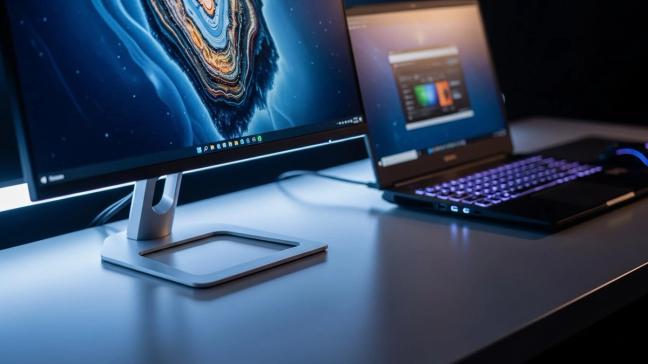
Gaming laptops now come with very impressive screens. This does not mean you should always use them as your only window on the world. At a desk, an external monitor is less a luxury and more a question of basic ergonomics.
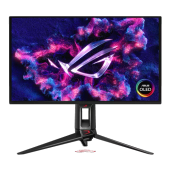
At the fancy end, Asus has made a habit of building the sort of screens that make colourists and gamers equally happy. The ROG Swift OLED PG27UCDM is a 27-inch 4K panel with a 240 hertz refresh rate, deep blacks and HDR performance that finally looks more like cinema and less like an enthusiastic spreadsheet. Plug your laptop into one of these, and you effectively replace its built-in display with something that can be both a serious work tool and an absurdly smooth gaming surface.
If your tastes run more towards "high refresh rates" than "high resolution", panels like the ROG Swift PG27AQDP push 1440p at 480 hertz, which has become the new benchmark for people whose livelihoods and identities are tied to how quickly they can click on small pixels. For larger fields of view, super ultrawides from Asus and MSI, the likes of the PG39WCDM and MPG 341CQP, let you stretch a game or a workspace across what feels like an entire wall. Pair one with a gaming laptop and a dock, and you have a command centre that can vanish into a bag when necessary.
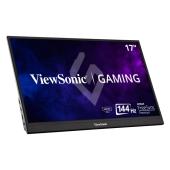
For those who travel incessantly, portable monitors are the more interesting story. Asus’ ROG XG16 is a 15.6-inch portable panel with a 144 hertz refresh rate and a built-in battery, designed to sit beside your laptop and double your screen real estate on trains, in hotel rooms or at tournaments. ViewSonic’s VX1755 and G-Story’s GSV56QM do similar things with slightly different emphases on size, response time and price. Any of them will remove the constant window-juggling that plagues mobile work, and they turn a laptop into a dual-screen setup wherever you happen to be.
The main idea is not decadence. It is comfort. A laptop screen is fine for a few hours. A properly positioned external monitor at eye height with a decent stand is the difference between finishing your session feeling vaguely human and closing the lid with the neck of a man who has just read the entire civil service code in one sitting.
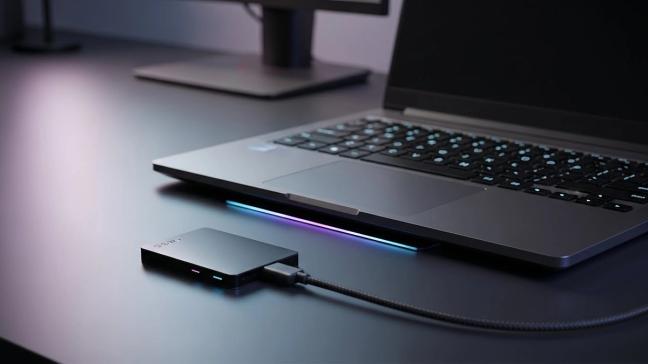
Game sizes have reached the stage where installing one popular title can feel like inviting a small town into your SSD. Throw in video captures, downloaded media, and actual work files and even a 2 TB internal drive can start to feel cramped. External SSDs are the modern equivalent of the second suitcase that lets you pretend you are travelling light.
At the pragmatic end of the spectrum, the Adata SD810 has emerged as a favourite among reviewers for game storage. It is compact, quick enough to stream assets without drama and priced sensibly enough that you do not feel as though you are buying the drive a seat of its own.
If your laptop has a 20-gigabit USB-C port and you care about squeezing every last megabyte per second out of it, devices like the PNY RP60 and Sabrent Rocket Nano V2 take advantage of that extra bandwidth. The former is rugged and a little chunky, designed for being thrown into bags and onto desks. The latter is comically small, about the size of a lavish stick of chewing gum, and ships with a rubber jacket to stop it escaping. Both are fast enough to host entire libraries of games or raw footage without becoming the bottleneck.
For something that looks as good as it performs, WD’s Black P40 remains a strong choice. Originally pitched at console owners, it has the same virtues on a gaming laptop: very solid performance, robust casing, tasteful lighting and enough capacity options to store the sort of collection that suggests you do not sleep very much. Samsung’s T9 is another reliable workhorse, built around years of experience making SSDs that can survive all the indignities of life in a bag.
If you want to flirt with the limits of USB4, SanDisk’s Pro-G40 and LaCie’s more creative-focused Rugged SSD lines add higher peak speeds and more resilience. They are overkill for simply moving save files around, but invaluable if your laptop pulls double duty as an editing machine for high-bitrate footage.
Whichever drive you choose, the real luxury is psychological. Knowing that you can install that next monstrous game without sacrificing three others and your entire project archive is oddly liberating.
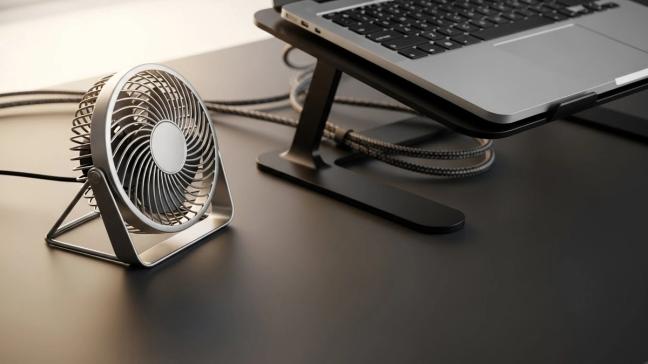
Beyond the glamorous purchases lie a few dull, important things that every gaming laptop benefits from.
A decent laptop stand or arm will lift the machine off the desk, improving both airflow and posture. Many of the better cooling pads double as stands; if yours does not, a simple metal riser with cable management will stop your neck protesting and your fans suffocating against the woodgrain.
A powered USB hub remains useful even in the era of generous docks, if only to prevent your main ports from being clogged with tiny dongles. A proper surge-protected power strip is unexciting until the day it quietly saves a very expensive laptop from a very cheap power spike. A backpack with actual padding and a laptop compartment has the same relationship to your machine that a decent case does to your phone. It is not an accessory so much as an insurance policy.
None of these will appear on social media as part of a “my setup” post. All of them will quietly determine how long your expensive toy remains a functioning piece of equipment rather than a fragile ornament.

A gaming laptop on its own is an impressive object. A gaming laptop supported by the right accessories is a system capable of moving gracefully between roles: docked desktop, portable cinema, serious workhorse and, when the occasion demands it, glorified Netflix machine.
You do not need everything at once. Start with the fundamentals. A cooling pad that stops the internals from overheating, a proper mouse and keyboard so that your hands can stop pretending they enjoy laptop ergonomics, and a headset that lets you hear and be heard without embarrassment. Add a dock and monitor when your budget and living arrangements permit. Introduce external storage the moment you catch yourself wondering which large thing you can bear to uninstall.
By the time you are done, your laptop will be the least interesting part of your setup in the best possible way. It will simply be the engine under the desk, feeding frames and files to a collection of well-chosen tools that make everything around it quieter, cooler and vastly more comfortable.
At that point, when someone asks whether a gaming laptop can really compete with a desktop, you can smile, gesture vaguely at the neat row of cables leading to your dock, and let the frame rate answer the question for you.
To receive the latest in style, watches, cars and luxury news, plus receive great offers from the world’s greatest brands every Friday.